
The Best WordPress Plugin for Amazon Creator API (2026 Guide)
When Amazon announced the Creator API in 2024, it changed how affiliates can access product data. The old Product Advertising API worked, but it was showing its age. Slow responses. Limited data. Stale pricing.
As the developers behind AmDisplayPro, we saw an opportunity. Not just to update our plugin, but to rethink what an Amazon affiliate plugin could be. We wanted to build something that takes advantage of the modern API, stays fast, and helps creators earn more.
Today, I want to show you what we built, why we built it, and how AmDisplayPro is fully compatible with the Amazon Creator API.
What Amazon Creator API Actually Does (And Why It Matters)
Before I get into our plugin, let me explain what changed with the Creator API. This isn’t just a minor update. It’s a completely new way of accessing Amazon product data.
The old Product Advertising API gave you:
- Product title
- Single product image
- Current price (sometimes delayed)
- Basic description
The new Creator API gives you all of that, plus:
- Multiple images – High-resolution shots from every angle
- Availability status – Know if it’s in stock before you link it
- Faster response times – Lower latency, better performance
- Better pricing data via OffersV2 – More accurate and structured pricing information
For affiliate marketers, this is important. Faster data means faster sites. Better availability data means you never link to out-of-stock products. The old API couldn’t deliver that reliably.
But here’s the catch. Many WordPress plugins haven’t fully migrated to the new API. They claim “Creator API support” but they’re not optimized for it. We built AmDisplayPro to work seamlessly with the modern API from day one.
How AmDisplayPro Works with Creator API
When we built AmDisplayPro, we focused on three things that actually matter to affiliates: speed, geolocation, and beautiful templates. Here’s how we use the Creator API to deliver those.
Smart Caching for Speed
The Creator API is fast, but calling it on every page load will slow your site down. We built a smart caching system that refreshes product data on your schedule—every hour, every six hours, every day. Your site stays fast. Your product data stays fresh. And you never hit Amazon’s rate limits.
Geolocation That Actually Works
This is one of our most requested features. When a visitor from Canada clicks your Amazon link, most plugins send them to Amazon.com. But they can’t buy from .com—they need Amazon.ca. So they leave, and you lose the commission.
AmDisplayPro detects where your visitor is and automatically sends them to their local Amazon store. UK. Canada. Australia. Germany. France. Italy. Spain. Japan. Our users report a 20-30% increase in international sales after turning this on.
Pricing and the Creator API (What Changed)
One of the biggest changes with the Creator API is how pricing is handled. The old API had pricing built into standard responses. The new API uses a dedicated resource called OffersV2 for pricing and availability data. This means more accurate, structured pricing information—but it also means your plugin needs to know how to request and display it properly.
Additionally, Amazon’s updated terms now encourage that price details are shown after the customer clicks through to Amazon. A “Check Price on Amazon” button creates curiosity and encourages clicks. And because the price is always accurate on Amazon’s side, your readers never click through to find a higher price than expected. Trust is maintained.
Our templates are designed with this in mind. Clean call-to-action buttons. No outdated prices. Just a clear path for your visitors to check the current price on Amazon.
What You Get in the Settings Page
We designed our settings page to be simple. No clutter. No confusion. Just what you need to run your affiliate site.
- One-click API setup – Enter your Access Key, Secret Key, and Associate Tag. We handle the rest.
- Cache control – Set how often product data refreshes (1-24 hours).
- Template previews – See what each template looks like before you choose.
- Geolocation settings – Enable automatic country detection for international sales.
- Default template – Choose your preferred template for all displays.
Everything has tooltips if you’re not sure what something does. We built this for beginners and pros alike.
How AmDisplayPro Handles Creator API Endpoints
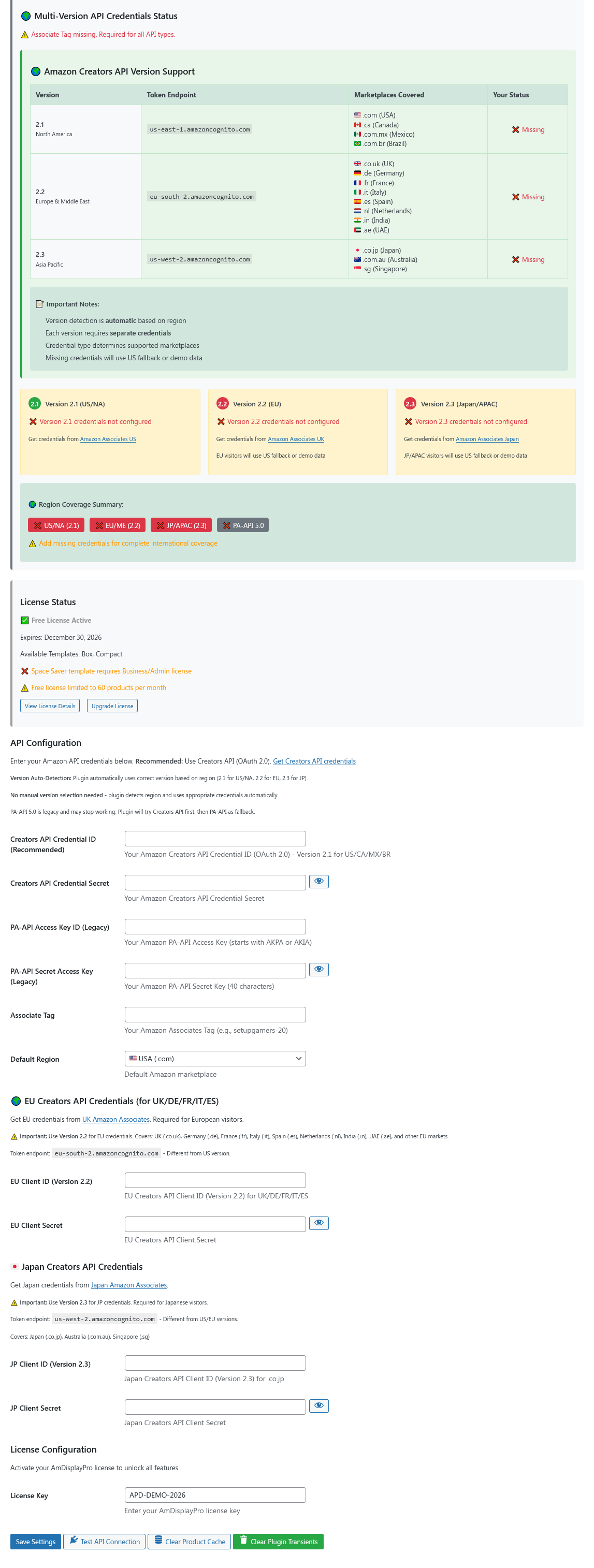
One of the most important parts of setting up the Amazon Creator API is understanding the endpoint system. Unlike the old API, which sometimes required specific URLs per country, the Creator API organizes marketplaces into three main regional groups.
Here’s how it works and how AmDisplayPro makes it simple to manage.
The Three Regional Endpoints
Amazon groups its marketplaces into three primary endpoints. You select the one that matches your audience:
- 2.1 – North America
Covers the United States (.com), Canada (.ca), and Mexico (.com.mx).
Use this if your primary audience is in the US, Canada, or Mexico. - 2.2 – Europe
Covers the United Kingdom (.co.uk), Germany (.de), France (.fr), Italy (.it), Spain (.es), Sweden (.se), Netherlands (.nl), Poland (.pl), Egypt (.eg), Turkey (.tr), UAE (.ae), and India (.in).
Use this for European and Middle Eastern audiences. - 2.3 – Far East
Covers Japan (.co.jp), Australia (.com.au), Brazil (.com.br), and Singapore (.sg).
Use this for Asia-Pacific and South American audiences.
The Old Way Was Complicated
With the old API, you had to manually figure out which endpoint to use. If you wanted to target the UK and Germany, you often needed separate configurations. It was easy to get wrong.
How AmDisplayPro Simplifies This
We built AmDisplayPro to handle regional endpoints automatically. You don’t need to worry about the technical differences between 2.1, 2.2, and 2.3.
- Choose your primary region – In the settings, simply select “North America”, “Europe”, or “Far East”. The plugin handles the endpoint connection for you.
- Enter associate tags for specific countries – While the endpoint covers a region, you still need a unique associate tag for each country. You can enter multiple tags in the settings (e.g., a US tag, a Canada tag, a UK tag).
- Automatic credential matching – When a visitor clicks a link, the plugin uses the endpoint for the region and the correct associate tag for their specific country.
- Geolocation integration – If a visitor from Germany lands on your US-targeted site, AmDisplayPro can detect their location, use the 2.2 (Europe) endpoint, and route them to Amazon.de with your German associate tag.
What This Means for You
You don’t need to understand the technical details of 2.1, 2.2, or 2.3. Just select your main region, enter your associate tags, and let AmDisplayPro handle the connections.
This is especially useful for:
- International affiliates – Reach audiences across Europe or North America without juggling multiple plugin instances
- Review sites – Display accurate local data based on where your reader is
- Niche sites with global traffic – Let geolocation do the heavy lifting
Our Templates (15 and Growing)
📦 Box Template
Classic product card with image, title, and button. Perfect for reviews.
📏 Compact Template
Minimalist design for sidebars and tight spaces.
✨ Simple Template
Clean, no-frills product display.
💨 Space-Saver Template
Ultra-compact horizontal layout.
🔦 Spotlight Template
Hero-style featured product display.
⚖️ Comparison Template
Side-by-side product comparisons.
📋 List Template
Vertical list format for roundup posts.
📱 Mobile Template
Optimized for phone users.
🏷️ Price Drop Template
Highlights sale items.
🔬 Micro Template
Tiny inline product display.
Why We Chose to Keep It Affordable
Some plugins charge $80, $100, even $200 a year. We think that’s too much. Affiliate marketing should be accessible, not a financial burden.
Our Personal license is $29/year. You get three templates (Box, Compact, Simple), unlimited products, geolocation, and priority support. That’s less than a month of coffee. And it’s less than half of what some competitors charge for fewer features.
- Personal: $29/year – 3 templates, unlimited products, geolocation, priority support, 1 site
- Business: $99/year – All 15 templates, white label, custom CSS, 5 sites
- Enterprise: $239/year – All templates, white label, 50 sites, VIP support, advanced analytics
Shortcode Examples
[amdisplaypro asin=”B0XXXXXXX”]
// Multiple products in comparison layout
[amdisplaypro asin=”B0XXXXXXX,B0YYYYYYY” template=”comparison”]
// Search by keyword
[amdisplaypro keyword=”wireless headphones” limit=”5″]
// Spotlight template for featured products
[amdisplaypro asin=”B0XXXXXXX” template=”spotlight”]
AmDisplayPro vs. Other Plugins
| Feature | Other Plugins | AmDisplayPro |
|---|---|---|
| Annual Price | $80–$200 | $29–$239 |
| Templates | 5–10 | 15 |
| Geolocation | Often extra cost | ✅ Included |
| Unlimited Products | Sometimes capped | ✅ Yes |
| Priority Support | Often not included | ✅ Yes (Personal+) |
| Smart Caching | Basic | ✅ Advanced |
Our Commitment to You
We built AmDisplayPro because we’re affiliates too. We run sites. We write reviews. We know what it’s like to spend hours on product displays. We wanted something better—so we built it.
We’re not promising features we haven’t shipped. We’re promising a fast, reliable, affordable plugin that does the basics really well. Geolocation. Beautiful templates. Simple shortcodes. No bloat.
We’ll keep improving. We’ll add features over time. But we’ll never compromise on speed, simplicity, or affordability.
Questions about AmDisplayPro? Want to see how it works on your site? Drop a comment below – we’d love to help you get started.
📝 Latest from Our Blog Updated Weekly
AmaLinks Pro Is Shutting Down: Here’s the Best Alternative for 2026
Don’t pay $499 for a legacy version with no support. Switch to AmDisplayPro for just $29/year. Full Creators API support, 15 templates, geolocation included.
Amazon Creators API vs PA-API 5.0: What Affiliates Need to Know in 2026
OAuth 2.0 vs AWS Signature. OffersV2 vs old pricing. Regional endpoints explained. Everything you need to migrate before the old API is phased out.
The Best Budget Amazon Affiliate Plugin in 2026 (Only $29/Year)
Why pay $80-$100/year? AmDisplayPro Personal gives you 3 templates, unlimited products, and geolocation for just $29. Full review inside.
Why I Switched from AAWP to AmDisplayPro (And Saved $70/Year)
Real user story: Moving from $101/year AAWP to $29/year AmDisplayPro. Same features, better geolocation, 15 templates, and priority support.
The Best WordPress Plugin for Amazon Creators API (2026 Guide)
Why we built AmDisplayPro from the ground up for OAuth 2.0, OffersV2, and regional endpoints. Clean templates, smart caching, geolocation included.
How to Set Up Amazon Creators API in WordPress (Step-by-Step)
Complete walkthrough: Get your Credential ID, Secret, and configure regional endpoints (2.1 NA, 2.2 EU, 2.3 FE). Works with any plugin.